The member's manual
This page describes exactly what happens when you buy access to a private Telegram group through a Membly bot. An operator can hand this page to their community as-is. Every bot message quoted here is the real text the bot sends.
How it works
You do everything in a private chat with the group's own Telegram bot. You pick a plan, the bot gives you a deposit address, and you send a stablecoin — USDC or USDT — from your own crypto wallet. Nothing is ever taken from your wallet automatically; you push every payment yourself.
Once the payment is seen on the blockchain, the bot sends you an invite link to the private group and approves your join request. Your access runs for the length of the plan you bought. When it ends, the bot removes you from the group unless you have renewed. You can renew, check how long is left, or fetch a fresh invite link at any time from the same chat.
Two different bots. The bot you talk to is the operator's own bot, with their name and picture. @MemblyBot is the platform bot that operators use to build theirs — you never need it.
Opening the bot
Open the link the operator gave you. It looks like t.me/their_bot_name. Telegram opens a private chat with a START button at the bottom. Press it, or send /start.
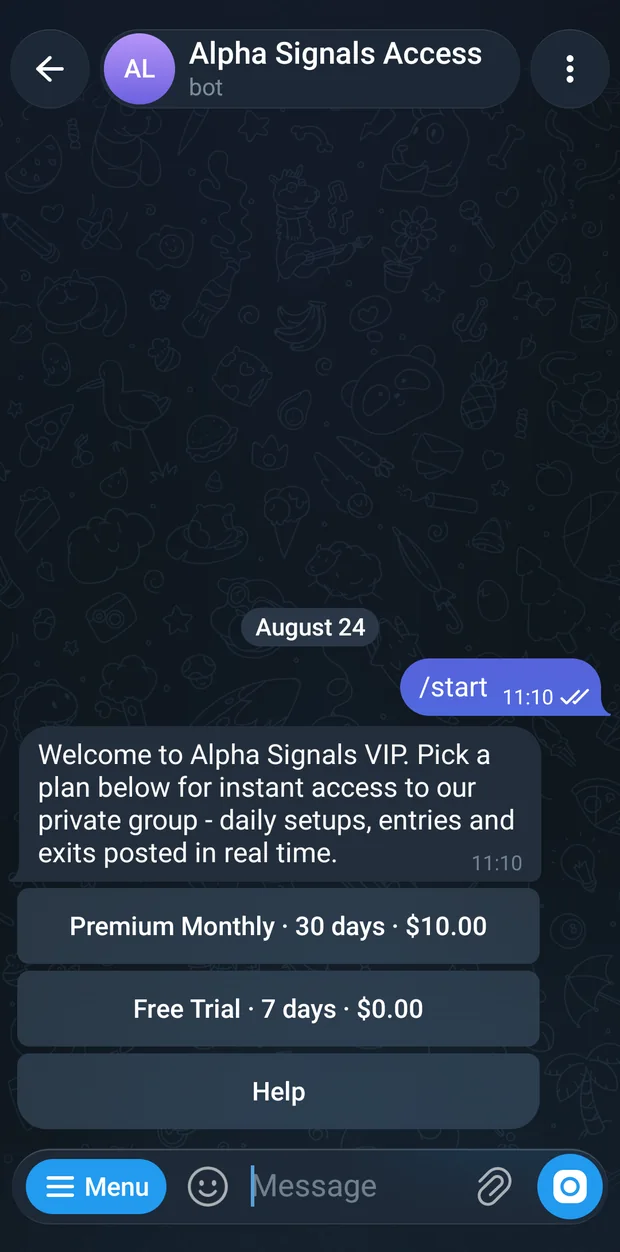
What you see next depends on where you already stand with this bot. There are five possibilities.
You are new here
You get a welcome message and the list of plans. If the operator has not written their own welcome, it reads:
Welcome! 👋
Pick a plan below, pay with USDC or USDT, and get instant access to the private group.
Operators often replace that text with their own, and may add a picture and their own information buttons above the plans. The plan buttons underneath are always the same.
You already have access
✅ You're in!
Expires 2026-08-08 14:30 UTC · 45 days, 3 hours left
Use the buttons below to get your invite link or manage your subscription.
Get Invite Link Status Renew / Extend Help
The second line shows your expiry date and how much time is left. If your plan never expires it reads Lifetime access instead, and the Renew / Extend button is not shown, because there is nothing to renew.
You have a payment in progress
⏳ Payment pending
We're waiting for your payment to confirm on-chain. This usually takes 1-2 minutes.
Already sent funds? Don't start a new payment. Tap Check Status to bring your payment address, QR code and remaining time back up.
Changed your mind? Tap Cancel Payment to start over.
Check Status Cancel Payment Help
Never start a second payment. If you have already sent funds, press Check Status. Starting again creates a second invoice at a different address, and your money sits at the first one waiting for a manual review.
You followed a link to one specific plan
Operators can share a link that points at a single plan — the web address ends in ?start=plan_3. That skips the plan list:
You came from a shared link for:
Monthly - 30 days - $10.00
Tap to continue.
Continue → Monthly See All Plans Help
If that plan has since been removed, you land on the normal plan list with this line added at the top:
That plan is no longer available. Here are the current options:
There are no plans yet
No plans available right now.
The operator may be setting things up.
Check Status
If the operator has a hidden plan that a coupon can open, the sentence If you have a coupon code, you can unlock a plan below. is added and an Unlock Coupon button appears above Check Status.
Choosing a plan
Each plan is a single wide button. There is nothing to scroll inside them — the whole offer is in the label. Lifetime plans come first, then the longest plans down to the shortest.
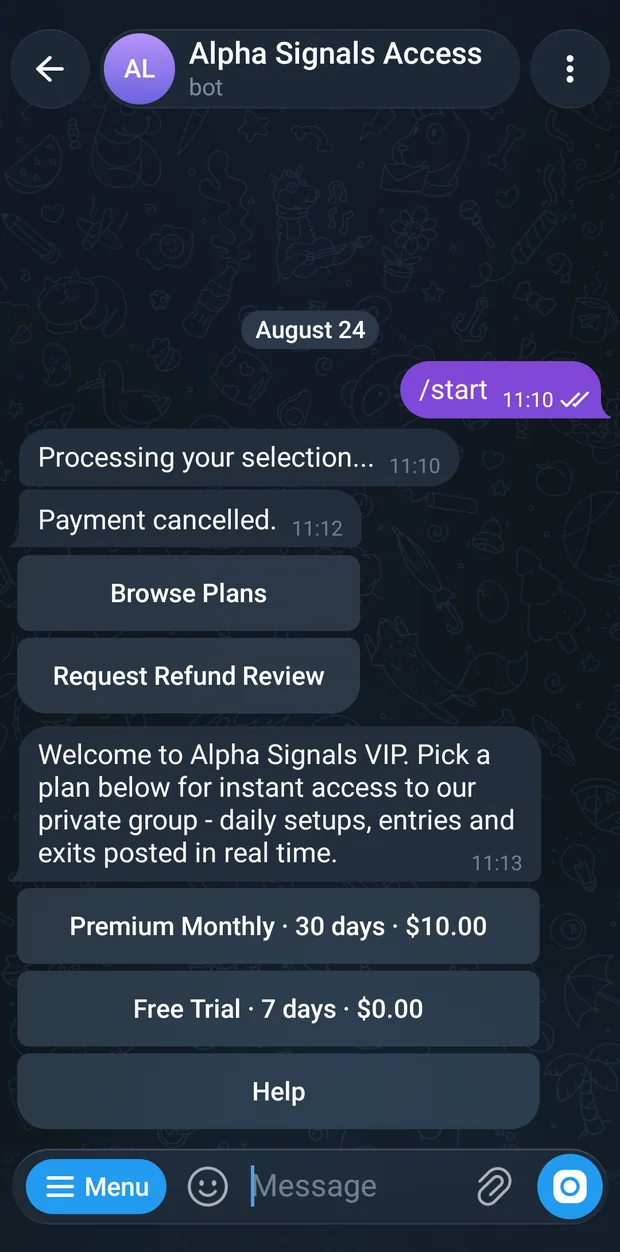
| What the button looks like | What it means |
|---|---|
| Monthly · 30 days · $10.00 | The plain case. Ten dollars buys thirty days. |
| Founder · Lifetime · $99.00 | A plan with no end date. It never needs renewing and you never get a reminder. |
| 🎁 Monthly · 7-day free trial | A free trial. No payment screen at all — pressing it grants access immediately. |
| 🔥 Monthly · 30 days · $3.00 first · then $10.00 | An introductory price. You pay the first figure this once; every later renewal costs the second figure. |
| 🔓 Inner Circle · 90 days · $50.00 | The open padlock means this plan was hidden until you redeemed a coupon code. Only you see it. |
Trials and intro prices are for newcomers. The gift and flame badges only appear if you have never had access through this bot before. Once you have subscribed once, the same plan shows its normal price.
Below the plans there is a Help button, and — when the operator has a hidden plan with a code still available — an Unlock Coupon button.
A plan priced at $0.00 is free. Any plan you actually pay for costs at least $0.20; that is the smallest amount the system will ever charge, even after a discount.
Coupon codes
One kind of code does two jobs. It can reveal a hidden plan, give you a discount, or both. You redeem it once and the effect sticks to your account on this bot.
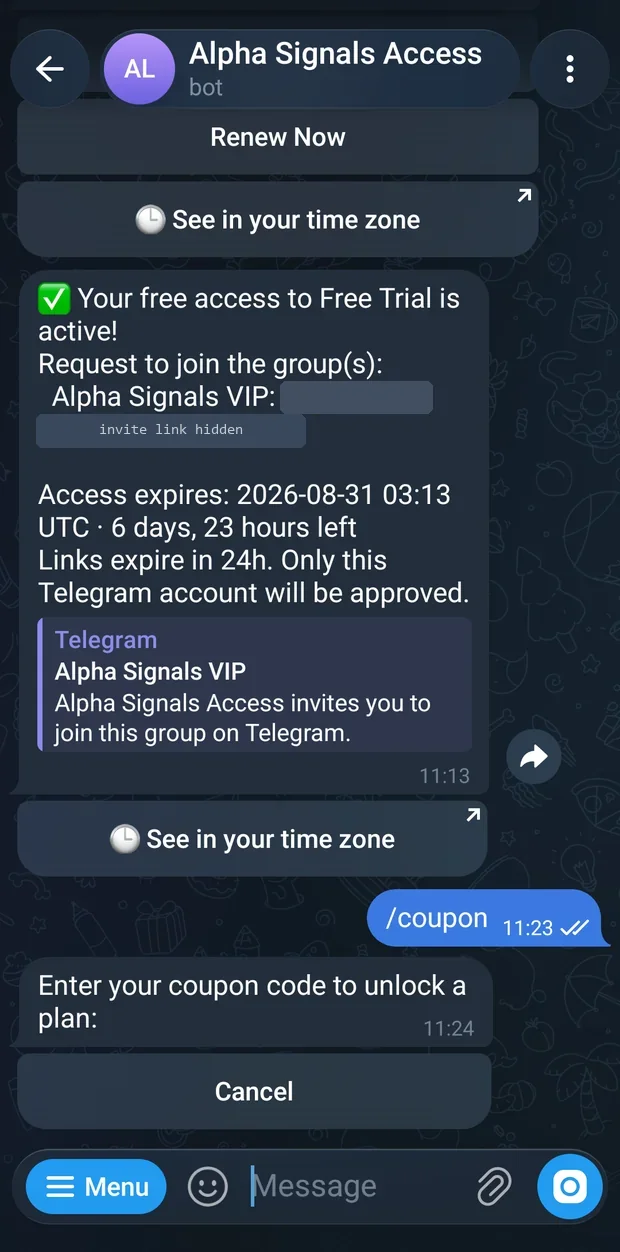
Open the coupon prompt
Press Unlock Coupon on the plan list, on the empty-plans screen, or inside
/help. Sending/coupondoes the same thing.Type the code
The bot asks:
Enter your coupon code to unlock a plan:
Cancel
Send the code as an ordinary message. Capital letters do not matter. Codes are three to thirty-two characters using letters, numbers, dashes and underscores.
Read what you unlocked
On success the bot confirms the plan and tells you what the code did.
A code that only reveals a hidden plan replies like this:
Unlocked: Inner Circle - 90 days - $50.00
This coupon-only plan is now available on your account.
Continue to checkout - $50.00 Browse Plans
A code carrying a discount shows the old price struck through beside the new one:
Unlocked: Monthly - 30 days - $10.00 $7.00
Your discount is applied automatically at checkout.
Continue to checkout - $7.00 Browse Plans
If you already have access, the button reads Use coupon to renew / extend instead. If you had already redeemed this same code before, the first word becomes Already unlocked.
There is no promo-code box at checkout
You never type the code again. Once redeemed, the discount is applied by itself. You will see it twice on the way through: on the payment-method screen the price appears as $10.00 $7.00 (SUMMER)
Price: $10.00 $7.00
Coupon SUMMER: -$3.00
Amount due: $7.00
A discount can never take the amount below $0.20.
When a code is refused
The bot stays on the prompt so you can try another code straight away.
| Problem | Exactly what the bot says |
|---|---|
| Unknown, expired, switched off, or belongs to a different bot | That coupon code is not valid, expired, or inactive for this bot. Try again: |
| Every redemption has been claimed | That coupon code has been used up. Try another code: |
| Contains a space, a symbol, or is the wrong length | Coupon code must be 3-32 characters using A-Z, 0-9, dash, or underscore. Try again: |
| You sent an empty message | Coupon code cannot be empty. Try again: |
| You pressed Cancel | Coupon entry cancelled. |
The prompt gives up after five minutes of silence. Press Unlock Coupon again to reopen it.
Paying
Checkout is three taps and one transfer from your wallet.
Press the plan you want
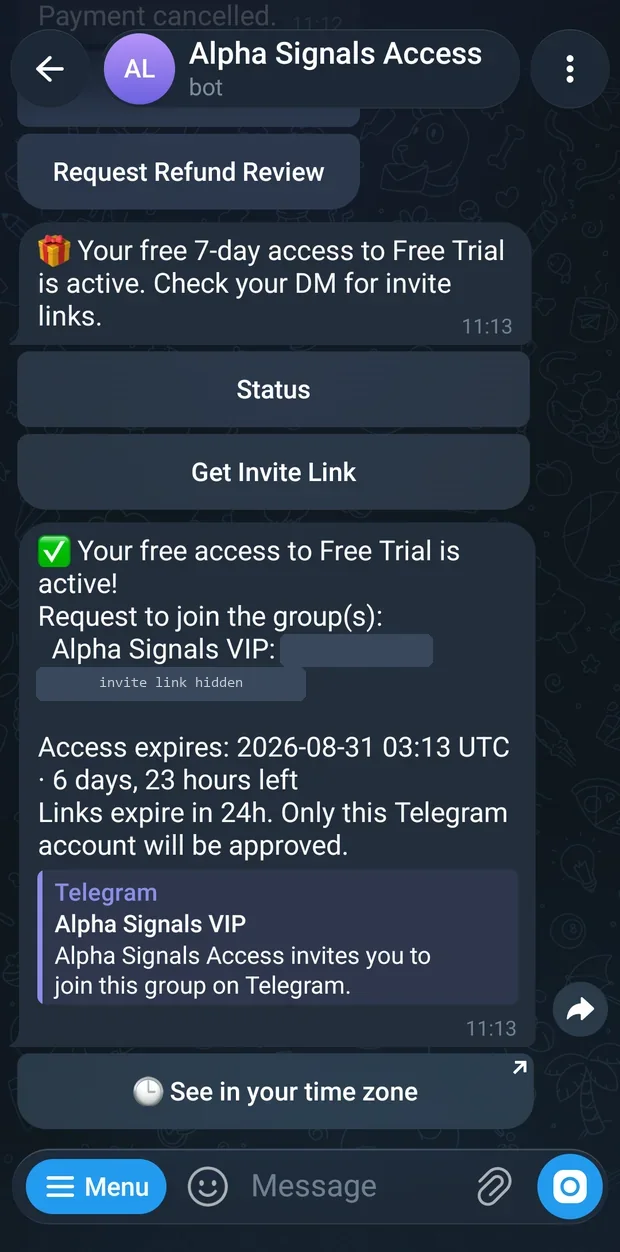
If the plan is free, or it is a trial and you are new, there is no payment at all — you are let in immediately:
🎁 Your free 7-day access to Monthly is active. Check your DM for invite links.
Status Get Invite Link
Otherwise the bot may stop you here for a good reason.
This plan is no longer available.means the operator withdrew it.You already have an active subscription (expires 2026-08-08 14:30 UTC).means use Renew / Extend instead.You've already used this one-time plan.andYou've already used your free access to this plan.mean exactly what they say. If you already have a live payment open, the bot brings that payment screen back instead of making a new one.Pick how to pay
You choose a currency and a blockchain together. There is one button per option the operator accepts, labelled currency first, then network.
Plan: Monthly — 30 days — $10.00
Choose how you'd like to pay:
USDC on Base USDT on Base USDC on BSC USDT on BSC « Back to plans Cancel
Pick the one that matches the network your wallet is actually on. If the operator accepts only one option, this screen is skipped and you go straight to the payment screen. If you hold leftover balance on this bot in that currency, the button also shows it, like USDC on Base · $2.50 credit.
Send the exact amount
The bot posts a QR code with the payment instructions as its caption. Everything you need to type into your wallet is in that caption.
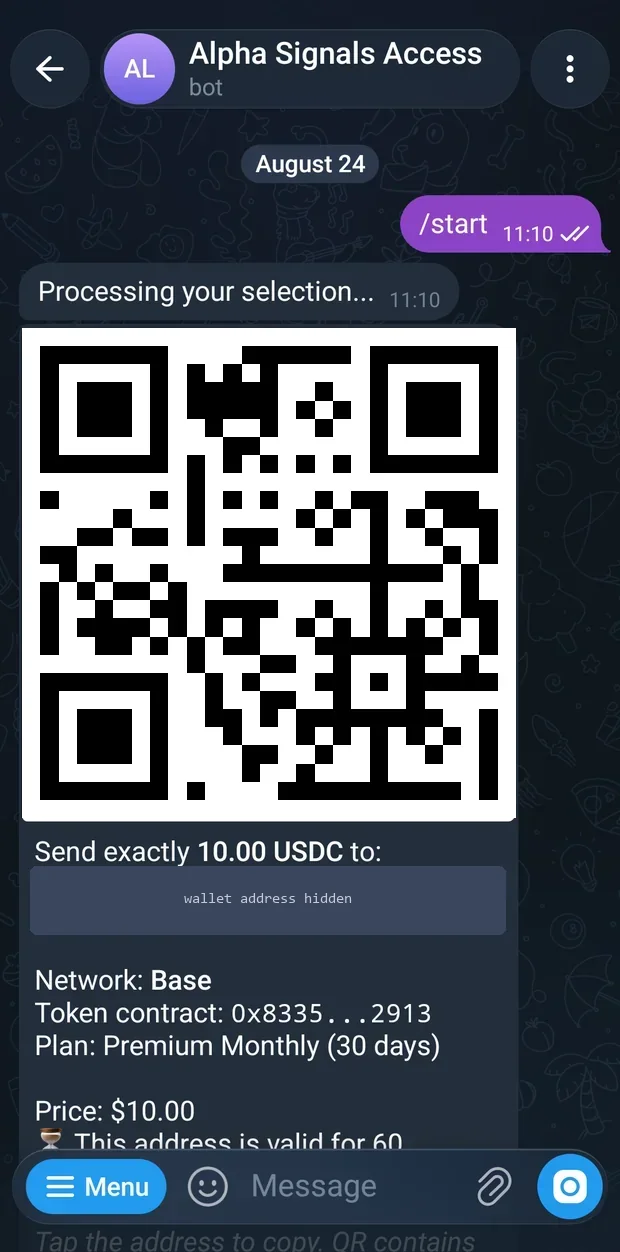
The payment screen: QR code, deposit address, amount, network and validity window. Send exactly 10.00 USDC to:
0x8Fa2…dA61Network: Base
Token contract: 0x8335…2913
Plan: Monthly (30 days)Price: $10.00
⏳ This address is valid for 60 minutes (until 15:42 UTC).Tap the address to copy. QR contains only the raw address; enter amount/token manually.
Payment is detected automatically after confirmations (usually 1-2 min).
USDC on Base only. Do not send native coin, another token, or the same token on another network.
Overpaying does not buy extra days; excess requires refund review.Check Status Cancel Payment
Reading the payment screen
- The QR code
- It holds the address and nothing else — no amount, no token. Scanning it fills in the recipient for you. You must still choose USDC or USDT yourself in your wallet and type the amount by hand. This is not a scan-and-pay code.
- The address
- Tap it and Telegram copies it. It was created for this one payment. Do not reuse an address from an earlier purchase, and do not hand it to anyone else.
- The amount
- Send exactly the figure shown. A tiny shortfall — a few cents lost to a wallet rounding — is accepted automatically, but a real shortfall leaves the payment incomplete until you top it up.
- Network
- The blockchain the bot is watching for this payment. Your wallet must be set to the same one.
- Token contract
- The identity of the exact token, shortened. Useful if your wallet lists several tokens with the same name and you want to be certain which one to pick.
- The hourglass line
- How long the address stays valid — 60 minutes by default, with the clock time it lapses. This is a snapshot taken when the message was sent, not a running countdown.
One address, one payment. The address is issued for this invoice only. Sending to it after the sixty minutes are up, or sending a second payment to it later, does not buy you anything automatically — the money is held and has to be sorted out by hand.
If your balance on this bot happens to cover the whole price, no address is created at all. You get a confirmation ending Check your DM for the invite link(s). and you are in.
Cancelling
Cancel Payment asks you to confirm first:
Cancel this pending payment? If you've already sent funds, wait for confirmation instead of cancelling.
Yes, cancel payment Keep waiting
Confirming replies Payment cancelled. and offers Browse Plans. Sending /cancel in the chat does the same thing.
Waiting for confirmation
Send the transfer, then leave the chat alone. The bot checks every deposit address it is watching roughly every 30 seconds, on its own, on the server. You do not have to keep Telegram open.
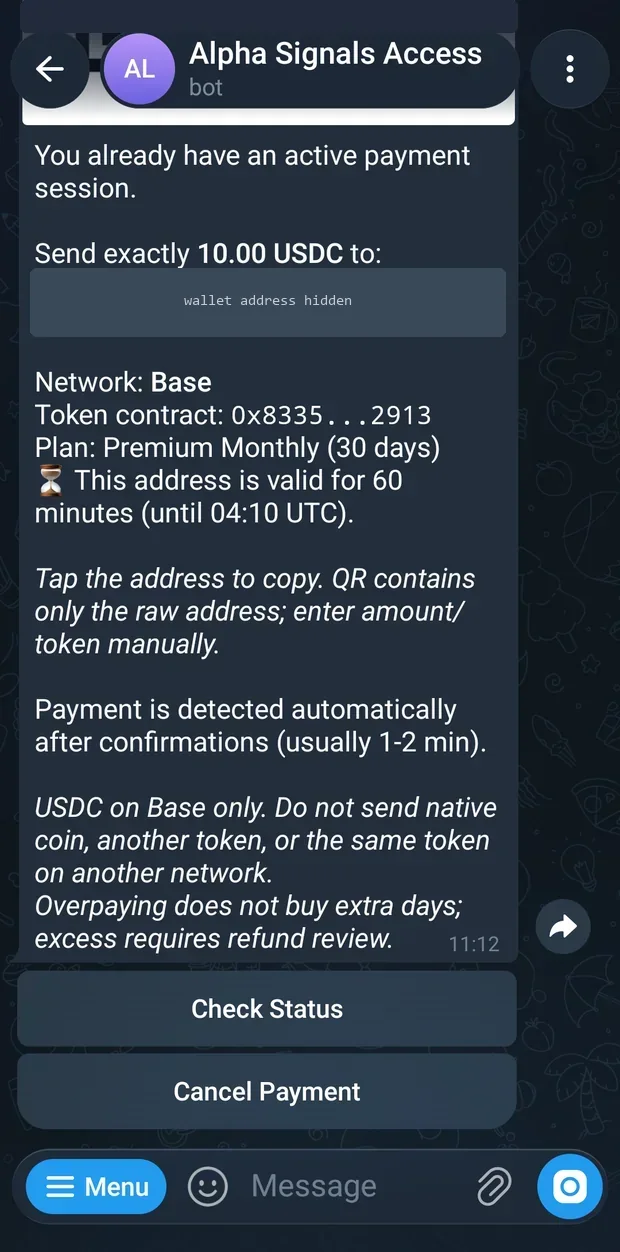
The screen does not update itself. There is no live countdown and no spinner. The remaining-time line is frozen at the moment the message was sent. To see the current state, press Check Status — the bot re-sends the QR code, the address and a freshly calculated time.
Expect the whole thing to take one to two minutes from the moment your wallet says the transfer went out. Most of that is the blockchain producing enough confirmations; the bot then needs up to another half minute to notice, and a few more seconds to send the message. If you are past five minutes, press Check Status; if you are past ten, see Troubleshooting.
About ten minutes before the address lapses, if nothing has arrived, the bot nudges you:
Heads up. Your payment session expires in ~10 min.
Send 10.00 USDC on the Base network to:
0x8Fa2…dA61
Open this bot and tap Status to see the payment screen with QR. Double-check the token and the network in your wallet before you send.
When the full amount lands:
✅ Payment received! Activating your subscription...
You'll get your invite link shortly.
🔗 Get Invite Link 📊 Status
If you sent too little
The bot tells you what is missing and keeps the same address open:
We received 7.00 USDC — thank you!
However, the required amount is 10.00 USDC.
Remaining: 3.00 USDC
Please send the additional 3.00 USDC to the same address before the session expires (~22 min left).
Remember: send only USDC on the Base network.
(USDC contract: 0x8335…2913)
Sending the wrong token or chain will result in permanent loss of funds.
If you sent too much
A small overpayment is kept as balance on the bot and spent automatically on your next renewal. A large overpayment stays at the address and needs a review before it can come back to you. Either way your subscription is activated for the agreed price — extra money does not buy extra days.
Wrong token. Send only the token named on your payment screen. If a different supported token turns up at your address, the bot spots it and tells you, but the subscription is not activated and the money has to be returned by hand through a refund review.
Wrong network. Your address is the same string on every network the bot supports, so a payment that lands on the wrong supported network is detected and can be returned to you — a person reviews it, so it is not instant. Networks that are not offered on your payment screen are never watched at all, and networks with a different address format never deliver anything. Check the network in your wallet before you press send.
Paying after the sixty minutes. Once the address lapses, the invoice is closed. Money sent afterwards is not lost and is never returned automatically — it sits at the address until you request a refund review. Do not pay a closed invoice hoping it will catch up.
When the window closes you get one of two messages. With nothing received:
Your payment session has expired (no deposit received within 60 minutes).
Open this bot and tap Browse Plans to begin a new payment.
Browse Plans
With something received but not enough, the bot names the shortfall and points you at Request Refund Review. An hour later, and again a day later, it offers you a one-tap restart:
You started checkout for Monthly but the payment window closed before funds arrived.
Tap below for a fresh payment address — $10.00.
Complete Payment
Getting into the group
Membly does not add you to the group. It gives you a link that raises a join request, then approves that request because your subscription is active. That is why a link copied from a friend is useless — the approval is tied to the Telegram account that made the request.
Seconds after payment confirms, the bot sends the links:
✅ Your subscription is active! Request to join the group(s):
Inner Circle: https://t.me/+AbCdEf123456
Expires: 2026-08-08 14:30 UTC · 30 days left
Links expire in 24h. Only this Telegram account will be approved.
🕒 See in your time zone
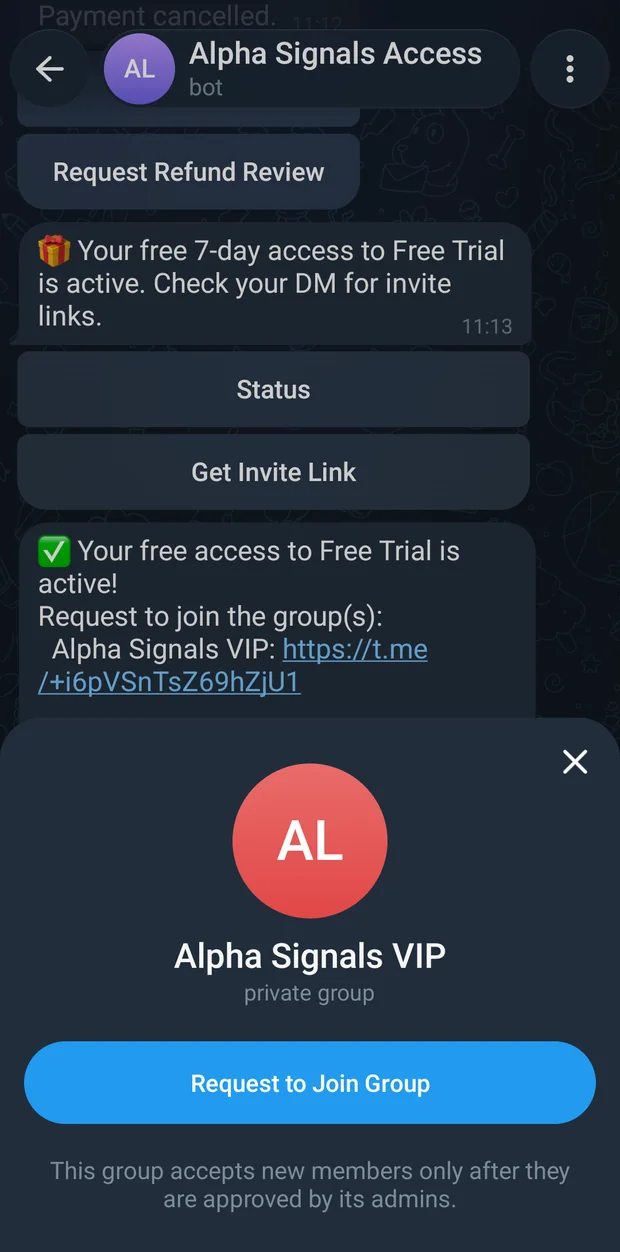
Tap the link
Telegram shows the group and a REQUEST TO JOIN button rather than joining you straight away.
Press it
Your request goes to the bot, which checks your subscription.
You are in
Approval is immediate. Telegram itself tells you that you have joined — the bot sends no extra message at this step.
If the link never arrived, or you lost it, you can fetch a new one any time. Send /getlink, or press Get Invite Link on /start or /status:
✅ Here are your invite links:
Inner Circle: https://t.me/+AbCdEf123456
Access expires: 2026-08-08 14:30 UTC · 30 days left
Links expire in 24 hours. Only your Telegram account will be approved.
Status Renew / Extend
Three things can go wrong there, and each says so plainly. You don't have an active subscription. means the payment has not landed yet. No groups are configured for this bot yet. Please contact the operator. and Could not generate invite links right now. Please try again later or contact the operator. are both on the operator's side — message them.
Each link lasts 24 hours. That is not your access expiring, only the link. Generate a fresh one whenever you need it; there is no limit and it costs nothing.
The status panel
Send /status at any time. The panel shows only what applies to you.
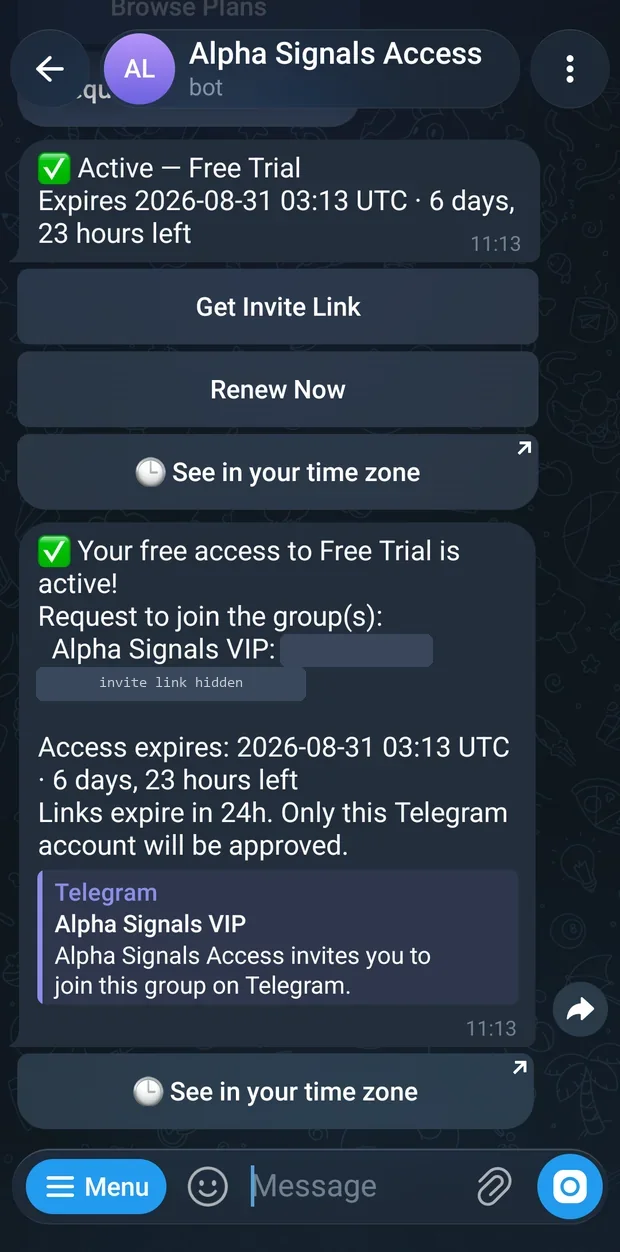
✅ Active — Monthly
Expires 2026-08-08 14:30 UTC · 45 days, 3 hours left
Get Invite Link Renew / Extend 🕒 See in your time zone
- The first line
- A tick and the plan name when you are in. Other states use their own marks:
⚠️ Grace period,⏳ Payment pending,❌ Expired,❌ Cancelled,❌ Removed, andNo subscription found. Browse plans to get started.when you have never bought anything. - The expiry line
- Date and time in UTC, then how long is left in the two largest useful units. A plan with no end date reads
Lifetime access. This never expires and there's nothing to renew.instead. - 🕒 See in your time zone
- Opens a web page that converts that UTC moment to your local clock. Only appears when there is a date to convert.
- Renew Now
- Replaces Renew / Extend once you are inside the last seven days.
- The auto-renew block
- Appears under the expiry line on plans that support it. See Renewing.
The other panels
Grace period — your paid time ran out but you have not been removed yet:
⚠️ Grace period — 2 days, 6 hours left
Monthly
Your paid term ended 2026-08-08 14:30 UTC. Access continues until 2026-08-11 14:30 UTC. Renew now and you keep the group without interruption.
Renew Now Get Invite Link
Payment pending — the bot re-sends your live QR code and address here. If the address has already lapsed you get text instead:
⏳ Payment pending — Monthly
We're waiting for your deposit to confirm on-chain. This usually takes 1-2 minutes after you send.
If you already sent funds, don't start a new payment — tap Check Status to refresh. If your payment session expired before you sent anything, cancel and start over for a fresh address.
Check Status Cancel Payment Help
Expired:
❌ Expired — Monthly
Expired on 2026-08-08 14:30 UTC
Resubscribe below to regain access.
Resubscribe Request Refund Review
Removed, after the bot took you out of the group:
❌ Removed — Monthly
You were removed from the group. You can subscribe again, request a refund review, or contact the operator for details.
Browse Plans Request Refund Review Help
There is also a Cancelled panel — Your subscription was cancelled. Ready to start again? — with Subscribe Again.
Renewing
Renewing before your time is up adds to your current period; you never lose the days you have already paid for. The payment screen for a renewal says so at the top:
✅ No days are lost. Your new period starts from your current expiry date (2026-08-08 14:30 UTC).
Renewing by hand
Send /renew, or press Renew / Extend, Renew Now or Renew wherever you see it. The bot reminds you where you stand and lists the plans:
✅ Current subscription expires on 2026-08-08 14:30 UTC.
Select a plan to renew:
Monthly - 30 days - $10.00 Quarterly - 90 days - $27.00 Cancel
You are not tied to the plan you bought before — pick any of them. From here it is the same currency picker and payment screen as a first purchase. Some answers you may get instead: You don't have a subscription., You have lifetime access — there's nothing to renew., or, for a plan the operator marked as one-off, "Trial Week" is a one-time plan and can't be renewed or extended.
Auto-renew
Auto-renew is not a card on file and it never pulls money. It reserves your deposit address so you can renew with a single transfer, no checkout. Turn it on from /status:
🔁 Auto-renew is on for Monthly.
Your payment address stays reserved: send $10.00 to that same address any time before your access ends and your subscription extends automatically. Nothing is ever taken from your wallet.
0x8Fa2…dA61
USDC · Base · 2026-08-08 14:30 UTC
Turn Off Auto-Renew
Send the plan price to that address whenever you like and your term extends by itself. The receipt arrives shortly after:
Auto-renew complete — thank you! $10.00 received for Monthly.
Your access now runs until 2026-09-07 14:30 UTC.
Status
Switched off, the block reads 🔁 Auto-renew is off for Monthly. Your access continues to the end of the current period, then stops. The option is offered only on repeating, dated, paid plans, and only after your first on-chain payment has produced an address worth reusing — before that, tapping it answers Auto-renew becomes available after your first on-chain payment, once there's an address to reuse.
Account credit
Money the bot holds for you — usually a small overpayment — is spent automatically the next time you renew, so you pay less. You see it on the currency buttons as USDC on Base · $2.50 credit, and again on the payment screen as an Account credit: -$2.50 line above the amount due. When it covers the whole price there is no address and no transfer at all.
The reminders
You do not have to remember anything. The bot writes to you as your date approaches, and once more if you drift away.
Your Monthly subscription expires in 3 day(s), on 2026-08-08 14:30 UTC.
Renew for $10.00 — tap below and you're set.
Renew
Last day: your Monthly subscription expires 2026-08-08 14:30 UTC.
Renew now for $10.00 to keep access without a break.
Renew
Your Monthly access ended a few days ago. Come back any time — $10.00 restores it instantly.
Renew
Lifetime plans get no reminders, because there is nothing to remind you about.
When access ends
Nothing happens the second your date passes. Operators can set a grace period, and while it lasts you keep the group and /status shows ⚠️ Grace period with the time remaining. Renew before it runs out and you are never removed.
Once the grace period is gone too, the bot removes you from every linked group and writes to you:
Your subscription has expired and you've been removed from the group.
Reactivate any time. Open this bot and send /renew (or tap /start to see plans).
Renew
You are not banned. Removal leaves you free to come back. Renew and press Get Invite Link — a fresh link, a fresh join request, and you are back in the same group.
If you renewed while the removal was being processed, you are skipped, not removed. Your history stays on file: /history lists every subscription you have had on this bot with its dates, what you paid and on which network, and gives you a 🧾 Receipt: Monthly · 2026-07-09 button for each payment. A receipt names the plan, amount, network, transaction and date, and is issued by the bot — verify the transaction yourself on a block explorer if you want to.
Refunds
Refunds are never automatic and are never sent back to the address you paid from — that address often belongs to an exchange, where a return would be lost. Every refund is a request that a person reviews.
Open a request
Send
/refund, or press Request Refund Review on/helpor on the expired, cancelled, removed or payment-cancelled status panels.Pick the payment
If more than one payment qualifies, the bot lists them as
Payment #418 - 10.00 USDC on Baseand you choose. If nothing qualifies you getNo refundable funds were found for your account. If you believe this is wrong, contact the operator with your payment transaction.Give a wallet address
The bot asks for the address the refund should go to, on the network the funds are actually sitting on, and warns:
Use a wallet you control. Do not use an exchange deposit address unless you are sure the exchange can credit refunds.Send the address as a message. A malformed address is refused with the reason and the correct format for that network.Wait for the operator
Refund review request sent to the operator for manual review.
Payment: #418
Amount to review: 10.00 USDC
Refund address: 0x8Fa2…dA61No funds were sent automatically.
Check Status Browse Plans
You can correct the address by running /refund again, but only up to a point. Once the operator has approved it, you get This refund is already locked in — the operator has approved it or it is being sent right now, so the destination can no longer be changed. — from then on, message the operator directly.
Membly does not decide refunds. Whether you get one, and how quickly, is between you and the group's operator. The bot only routes the request and holds the address.
Commands
Five of these appear in Telegram's own menu when you press the / button. The rest work exactly the same, they are just documented in /help rather than the menu.
| Command | What it does | In the menu |
|---|---|---|
/start | Subscribe to this group — the plan list, or your current state if you already have one | yes |
/status | Check your subscription — expiry, auto-renew, and a live payment screen if one is open | yes |
/getlink | Get fresh invite links — a new 24-hour join-request link | yes |
/cancel | Cancel pending payment — drops an open invoice; inside a wizard it cancels that wizard instead | yes |
/refund | Request manual refund review — accepts /refund <address> to skip a step | yes |
/renew | Renew or extend, choosing any current plan | no |
/coupon | Redeem a code to unlock a hidden plan or a discount | no |
/history | Your past subscriptions and downloadable payment receipts | no |
/help | The full help panel, including the payment troubleshooting notes | no |
Use the bot in a private chat. Commands sent inside the group do nothing, and pressing a bot button there answers Please use this bot in a private chat. Sending too many messages too fast shows You're going too fast — please wait a moment. — wait a second and carry on.
The bot also remembers the language you signed up in. If you first subscribed with Telegram set to Spanish, the bot keeps writing to you in Spanish even after you switch your app back to English.
Troubleshooting
I paid but I was never added to the group
Payments confirm within one to two minutes once the blockchain has produced the required confirmations. If it has been longer, send /status. If it shows ✅ Active, the payment worked and only the link went astray — press Get Invite Link, tap the new link and press REQUEST TO JOIN. If it still shows ⏳ Payment pending, press Check Status to refresh, and check in your wallet that the transaction really left, on the network the payment screen named. Do not start a second payment.
I sent the wrong amount
Too little: send the difference to the same address before the sixty minutes are up. The bot messages you with the exact remaining figure each time more arrives, and a very small shortfall is waved through automatically. If the window has already closed with a partial deposit inside, the money is safe but stuck — request a refund review from /status, or use the Complete Payment button the bot offers an hour later.
Too much: a small excess becomes balance on this bot and is spent on your next renewal by itself. A large excess is held at the address for refund review. Either way your subscription is activated for the price you agreed — the extra never becomes extra days.
I sent it on the wrong chain
If you sent a supported token on the other supported network — USDC on BSC when the invoice said Base, say — your address exists there too, the bot notices, and it tells you so. Your subscription is not activated from that payment, but the funds can be returned: /status, then Request Refund Review, and give an address on the network the money actually landed on. A person reviews it, so it is not instant.
If you sent on a network the payment screen never offered, nothing is watching it. Networks that use a different address format never delivered anything in the first place. Always check the network selector in your wallet before you press send.
The address expired while I was paying
The invoice closed but your money is not lost, and it is never sent back automatically. Open /status, then Request Refund Review, and the operator can either refund you or credit the payment by hand. To get access in the meantime, start a fresh checkout — you get a new address with a new sixty-minute window. Next time, have the wallet open and funded before you press the plan button.
My coupon code is refused
Read which of the two messages you got. That coupon code has been used up. Try another code: means the code was real but every redemption is claimed — ask the operator for another. That coupon code is not valid, expired, or inactive for this bot. Try again: means it is unknown here: check for typos, and check you are in the right bot, since a code made for one operator's bot does not work in another's. A complaint about length or characters means the code you typed is not the shape a code can be — you probably pasted something extra with it.
I lost the invite link
Send /getlink. Links are deliberately short-lived — twenty-four hours — and you can make as many as you like for as long as your subscription is active. There is nothing to recover; just make a new one.
I was removed but my subscription says it is still active
The bot only removes people it cannot find an active subscription for. Two things usually explain this. Either you joined from a second Telegram account and the subscription sits on the first one — check which account is in the group. Or you were in the group before you paid, and the bot's check caught up with you. Either way the fix is the same: /status to confirm it reads ✅ Active, then Get Invite Link and a new join request. Being removed does not ban you. If it happens again straight away, message the operator with your Telegram username.